You earn an official certificate of completion when you finish an eligible guide to 100%. Use it to showcase your achievements and track your progress.
- Which guides give a certificate
- How to find your certificate
- How to change the name on your certificate
Which guides give a certificate
You can currently earn certificates by finishing any course within the AI tools category, including:
- ChatGPT
- Claude
- Claude for Excel
- Claude: Deep Dive
- MidJourney
- Jasper AI
- Stable Diffusion
- Lovable
- Gemini
- DALL-E
- DeepSeek
- ChatGPT: Deep Dive
- Omni
- Perplexity
- Kling
- Canva AI
- Communicating with AI
- Claude Code
Note: You earn a certificate once you have completed a guide to 100%.
How to find your certificate
On the web:
- Go to the Profile section.
- Find Certificates.
- Click the completed guide to view and download your certificate.
In the mobile app, there is no Certificates section in your Profile. Open the completed guide to view your certificate.
How to change the name on your certificate
- Open your certificate (on the web in Profile → Certificates, in the app inside the completed guide).
- Select the Edit name option.
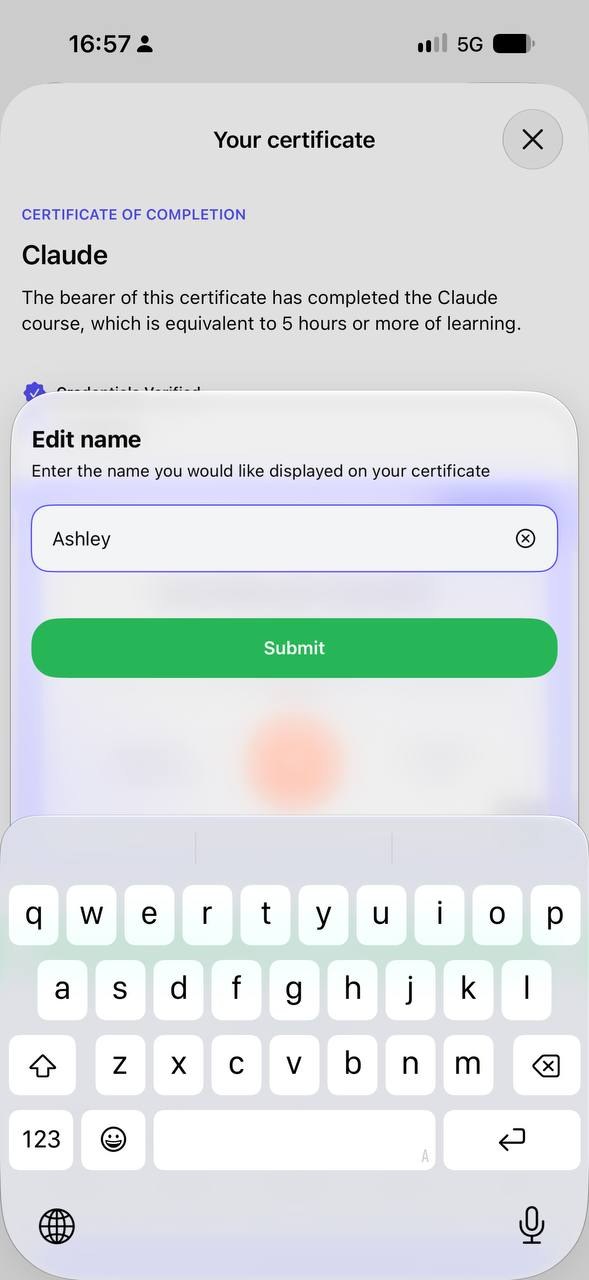
- Enter the correct name and submit the changes.
Need further clarification?
Contact us at support@coursiv.io or submit a request in our Support Center.
Was this article helpful?
That’s Great!
Thank you for your feedback
Sorry! We couldn't be helpful
Thank you for your feedback
Feedback sent
We appreciate your effort and will try to fix the article